
Human Resource Management
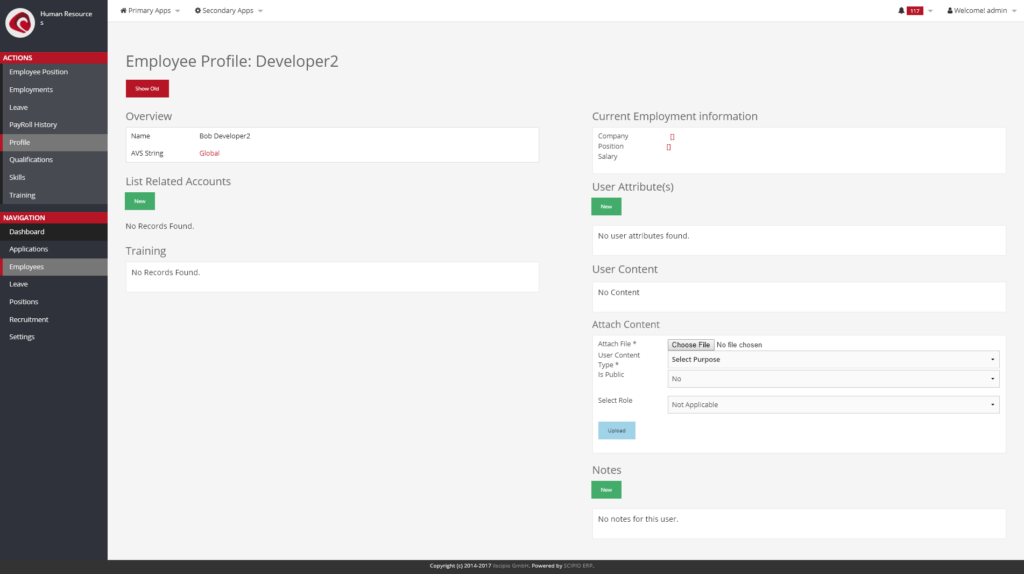
Profile Example
The human resource management application (“HR”) is designed to simplify the management of employees and to standardize the recruitment and training process inside of companies. It is here, that new openings (employee positions) can be created and applicants can be evaluated.
The human ressource management application gives detailed access to employee information. All skills, qualifications & trainings, position history, leave (vacation & medical) and even their payroll history can be stored and accessed. The application is interconnected with the User Management application, which contains all the detailed information to a particular user (in a way, being an employee is just a specific attribute to an otherwise existing user).
The application is split into the following subsections:
- Applications
- Search
- Application Detail
- Employees
- Search
- Employee Profile
- Employee Position
- Employments
- Leave
- PayRoll History
- Profile
- Qualifications
- Skills
- Training
- Leave
- Employee Leave
- Leave Approval
- Positions
- Search
- Position
- Employee Position
- Fulfillments
- Reporting Structure
- Responsibilities
- Summary
- Recruitment
- Internal Job Postings
- Approval
- Internal Applications
- Job Interview
- Relocation
- Job Requisition
- Internal Job Postings
- Settings
- Employee Leave Type
- Job Interview Type
- Pay Grades
- Position Types
- Public Holiday
- Responsibility Types
- Termination Reasons
- Termination Types
- Training Class Type
The application in 4.0#
The human resources manager in 4.0: the employees, the positions and the leave that waits for an answer.
Do it with an agent#
Human resources ships an MCP server. Point your agent at the human resources webapp and it hires, pays and reviews with you.
claude mcp add --transport http scipio-humanres "https://<host>/humanres/mcp" --header "Authorization: Bearer <token>"Two tools carry the application. Every call names the tool and one action.
employee—create,find,get,employment_create,employment_end,leave_create,leave_update,leave_approve,pay_history_add,skill_add,qualification_add,perf_review_create,training_assign.position—create,update,find,fulfill,job_requisition_create,employment_app_create.
Take a new colleague on#
“Create the employee Mia Bauer, employ her from the first of October as a welder, set the pay and assign the safety training.”
The agent calls employee:create, employee:employment_create,
employee:pay_history_add and employee:training_assign. Pay is a confirmed
call.
Answer a leave request#
“Who asked for leave in October? Approve the ones that do not collide with the welding line.”
The agent calls employee:find, reads the requests and calls
employee:leave_approve per person. It can ask the manufacturing server for
shop_floor:work_center_load first.
Open a position#
“Open a second welder position for the plant and raise a requisition.”
The agent calls position:create and position:job_requisition_create. An
application arrives with position:employment_app_create, and
position:fulfill closes the loop.
The token is a user login. The agent does what that user may do, and nothing more. Every call writes one audit row. Read the security model before you hand a token out.