
Components
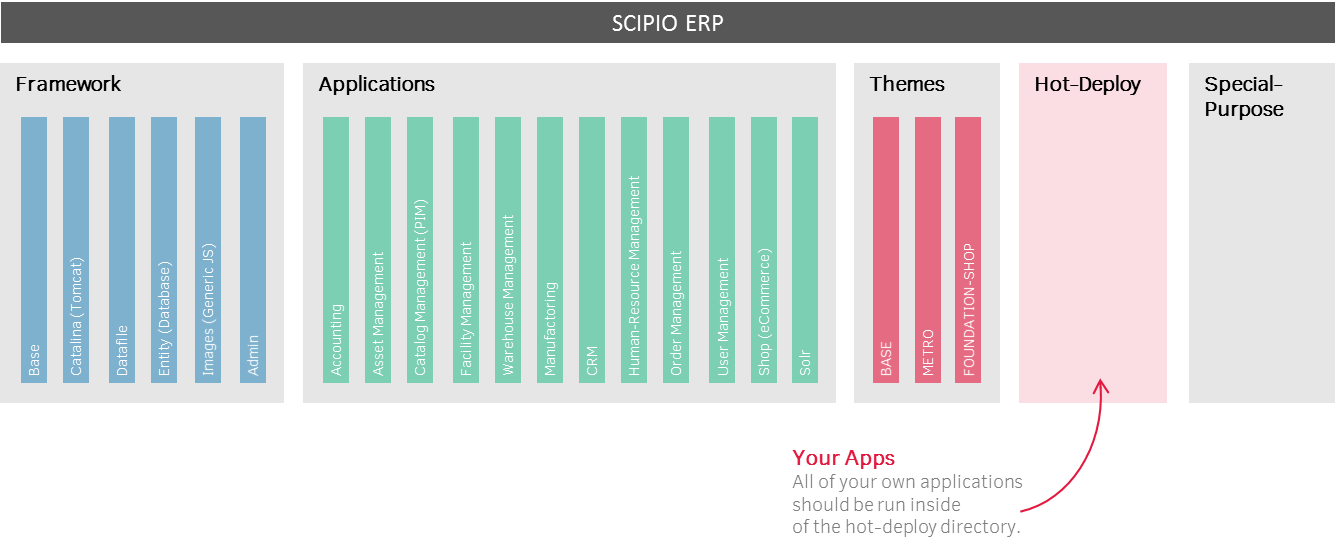
Scipio ERP structures its component inside of 5 major directories:
- Framework (Components containing framework related sources, generic screens and configuratins)
- Applications (First-Level Applications; ideally isolated on their own)
- Themes (Theme Components)
- Hot-Deploy (Your own application space)
- Special-Purpose (Second-Level applications; Demo cases; untested or unfinished applications)
Besides a general configuration, we recommend to focus only on the hot-deploy & theme components for your own customization efforts. Because of inheritance, there shouldn’t be a need to directly modify the other applications and this will guerantee compatibility with future releases of the Scipio ERP framework.
Component#
Components are essentially web-applications that have been modified to fit the Scipio ERP architecture.A blank component can be generated by running the following ant command, which will also generate the recommended component structure:
gradlew.bat createComponent -PcomponentName=mycomponent -PresourceName=MyComponent -PwebappName=mycomponent -PbasePermission=MYCOMPONENTA component.xml instructs Scipio ERP to run the new application on runtime:
<?xml version="1.0" encoding="UTF-8"?>
<ofbiz-component name="myComponent"
xmlns:xsi="http://www.w3.org/2001/XMLSchema-instance"
xsi:noNamespaceSchemaLocation="http://ofbiz.apache.org/dtds/ofbiz-component.xsd">

<!-- Resource-Loader -->
<resource-loader name="main" type="component"/>

<!-- Config files -->
<classpath type="dir" location="config"/>

<!-- Runtime Libraries -->
<classpath type="jar" location="build/lib/*"/>

<!-- Entity definitions -->
<!-- Entities are Java annotations now: @Entity on an interface in the component source.
     An XML model still loads if you keep one. -->

<!--Entity Events-->
<!-- EECA rules are Java annotations now: @Eeca. An XML rule file still loads. -->

<!-- Service definitions -->
<!-- Services are Java annotations now: @Service. An XML model still loads. -->

<!-- Service event definitions -->
<!-- SECA rules are Java annotations now: @Seca. An XML rule file still loads. -->

<!-- Mount instruction for the web-application and base permission configuration -->
<webapp name="myWebapp"
title="My own Webapp"
server="default-server"
location="webapp/myWebapp"
base-permission="OFBTOOLS,MYWEBAPP"
mount-point="/mywebapp"/>
</ofbiz-component>
Once registered, the web-application has access to the other applications and services. By extending the application, the component can inherit from other components and reuse or even extend on their respective services & entity definitions. The nice thing is that this practically merges all applications together, while still remaining modular at its core.
Web application deployment#
Since Scipio ERP is essentially a Tomcat servlet container, you can also run any web-applcation along your other components:
- Unzip your War file locally.
- Create a new folder in the hot-deploy directory by whatever name you want your new application to run under (Tip: use the gradlew.bat createComponent command to generate a component skeleton in the hot-deploy folder of your Scipio ERP installation).
- Copy every folder within the war file to this webapp folder (there should be a web-inf directory under hot-deploy/yourapp/webapp/ now
- Restart Scipio ERP and give it all a go…