
Calendar
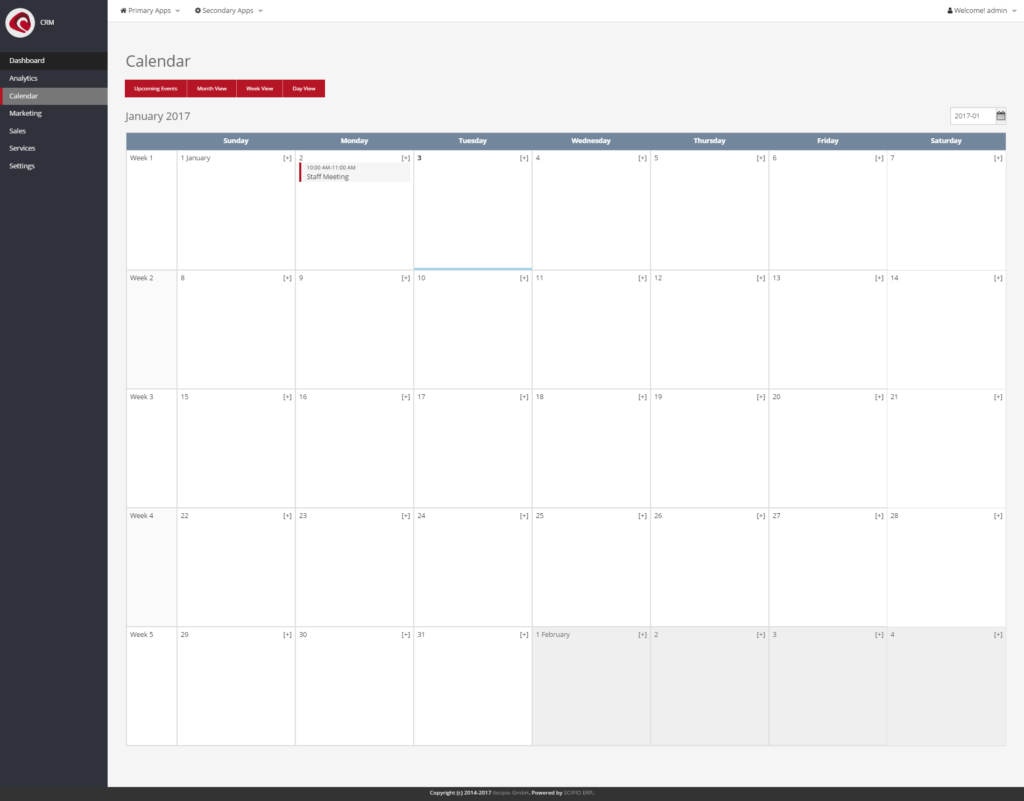
The shared calendar (“CRM » Calendar”) is utility function, which can be used to organize company wide events. Each calendar is non-user specific and shared with all parties with access to it. It is possible to switch between a day/week/month view. New events can be added by clicking on the “[+]” Icon next to the respective date. A new Screen will open up, which allows new events to be added. The following options are available:
- Event Name (mandatory)
- Status
- Accepted
- Tentative
- In Planning
- Completed
- Confirmed
- Planned
- Needs Action (Approved)
- Semt
- Declined
- Delegated
- Cancelled
- Description
- Event Type
- Available
- Business Travel
- Event
- Meeting
- Milestone
- Personal Time off
- Public Holiday
- Training
- Scope
- General, public access
- Restricted, private access
- Very restricted, confidential access
- Start-Date & End-Date
Once created, users can be assigned to the events.
Do it with an agent#
The calendar reads work efforts, and work efforts have an MCP server. Point your agent at the work effort webapp to plan, assign and book time. The work effort application describes the tools in full.
claude mcp add --transport http scipio-workeffort "https://<host>/workeffort/mcp" --header "Authorization: Bearer <token>"One tool carries the application. Every call names the tool and one action.
task—create,update,get,find,set_status,assign,assignment_update,assoc_add,note_create,note_update,event_reminder_add,content_attach,request_create,timesheet_create,timesheet_set_status,timesheet_to_invoice,time_entry_create,time_entry_update.
Put a meeting in the calendar#
“Put a one-hour review with the plant manager on Thursday at ten and remind us both an hour before.”
The agent calls task:create, task:assign twice and
task:event_reminder_add. The entry shows in this calendar at once.
The token is a user login. The agent does what that user may do, and nothing more. Every call writes one audit row. Read the security model before you hand a token out.